Query 安装 和jQuery hide
jQuery 库是一个 JavaScript 文件,您可以使用 HTML 的 <script> 标签引用它:
<head> <script src="jquery-1.10.2.min.js"></script> </head>
如果你的站点用户是国内的,建议使用百度、又拍云、新浪等国内CDN地址,如果你站点用户是国外的可以使用谷歌和微软。
Staticfile CDN:
<head> <script src="https://cdn.staticfile.org/jquery/1.10.2/jquery.min.js"> </script> </head>
百度 CDN:
<head> <script src="https://apps.bdimg.com/libs/jquery/2.1.4/jquery.min.js"> </script> </head>
又拍云 CDN:
<head> <script src="https://upcdn.b0.upaiyun.com/libs/jquery/jquery-2.0.2.min.js"> </script> </head>
新浪 CDN:
<head> <script src="https://lib.sinaapp.com/js/jquery/2.0.2/jquery-2.0.2.min.js"> </script> </head>
Google CDN:
<head> <script src="https://ajax.googleapis.com/ajax/libs/jquery/1.10.2/jquery.min.js"> </script> </head>
Microsoft CDN:
<head> <script src="https://ajax.aspnetcdn.com/ajax/jquery/jquery-1.9.0.min.js"></script> </head>
使用hide ,先在application增加引入jQuery的文件
<script src="https://cdn.staticfile.org/jquery/1.10.2/jquery.min.js">、
然后在视图页面的body增加内容
<p>如果你点我,我就会消失。</p>
<p>继续点我!</p>
<p>接着点我!</p>
<script>
$(document).ready(function(){
$("p").click(function(){
$(this).hide();
});
});
</script>
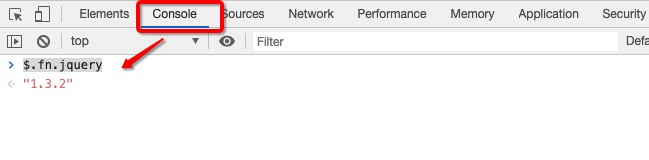
在浏览器的 Console 窗口中使用 $.fn.jquery 命令查看当前 jQuery 使用的版本: